
VR2 Flash Codes

Low Battery Voltage
The battery needs charging or there is a bad connection to the battery. Check the connections to the battery. If the connections are good, try charging the battery.
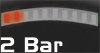
Left Motor Disconnected
The left motor* has a bad connection. Check all the connections and leads between the left motor and the Power Module.
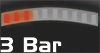
Left Motor Wiring Trip
The left motor* has a short circuit to a battery. Check all the connections and leads between the left motor and the battery.
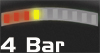
Right Motor Disconnected
The right motor* has a bad connection. Check all the connections and leads between the right motor and the Power Module.
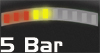
Right Motor Wiring Trip
The right motor* has a short circuit to a battery. Check all the connections and leads between the right motor and the battery.

Charger Connected
The wheelchair is being prevented from driving by an external signal. The exact cause will depend on the type of wheelchair you have, one possibility is the battery charger is connected.
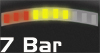
Possible Joystick Trip
A joystick trip is indicated. Make sure that the joystick is in the center position before switching on the VR2.
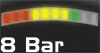
Possible Control System Trip
A control system trip is indicated. Make sure that all connections are secure.
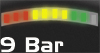
Solenoid Brake Trip
The parking brakes have a bad connection. Check the parking brake and motor connections. Make sure the system connections are secure.
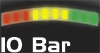
High Battery Voltage
An excessive voltage has been applied to the Power Module. This is usually caused by a poor battery connection. Check the battery connections.
Commonly Seen Informational Flash Codes

Charge Step
The batteries are charging.

Joystick Displaced
The joystick has been displaced whilst the control system is switched on. Place the joystick in the center position and turn the control system on and off again.
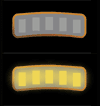
Speed Limit In Operation
This indicates the speed of the wheelchair is being limited for safety reasons. The exact reason will depend on the type of wheelchair, however, the most common cause is that the seat is in the elevated position.
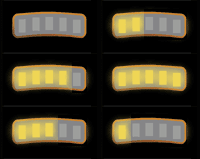
Control System Locked
This indicates that the VR2 has been locked and cannot be driven. Unlock the VR2.
* If the programmable parameter, Motor Swap has been enabled, then left and right hand references in this table will need transposing.
If the problems persist after you have made the checks described above please contact your service agent.
